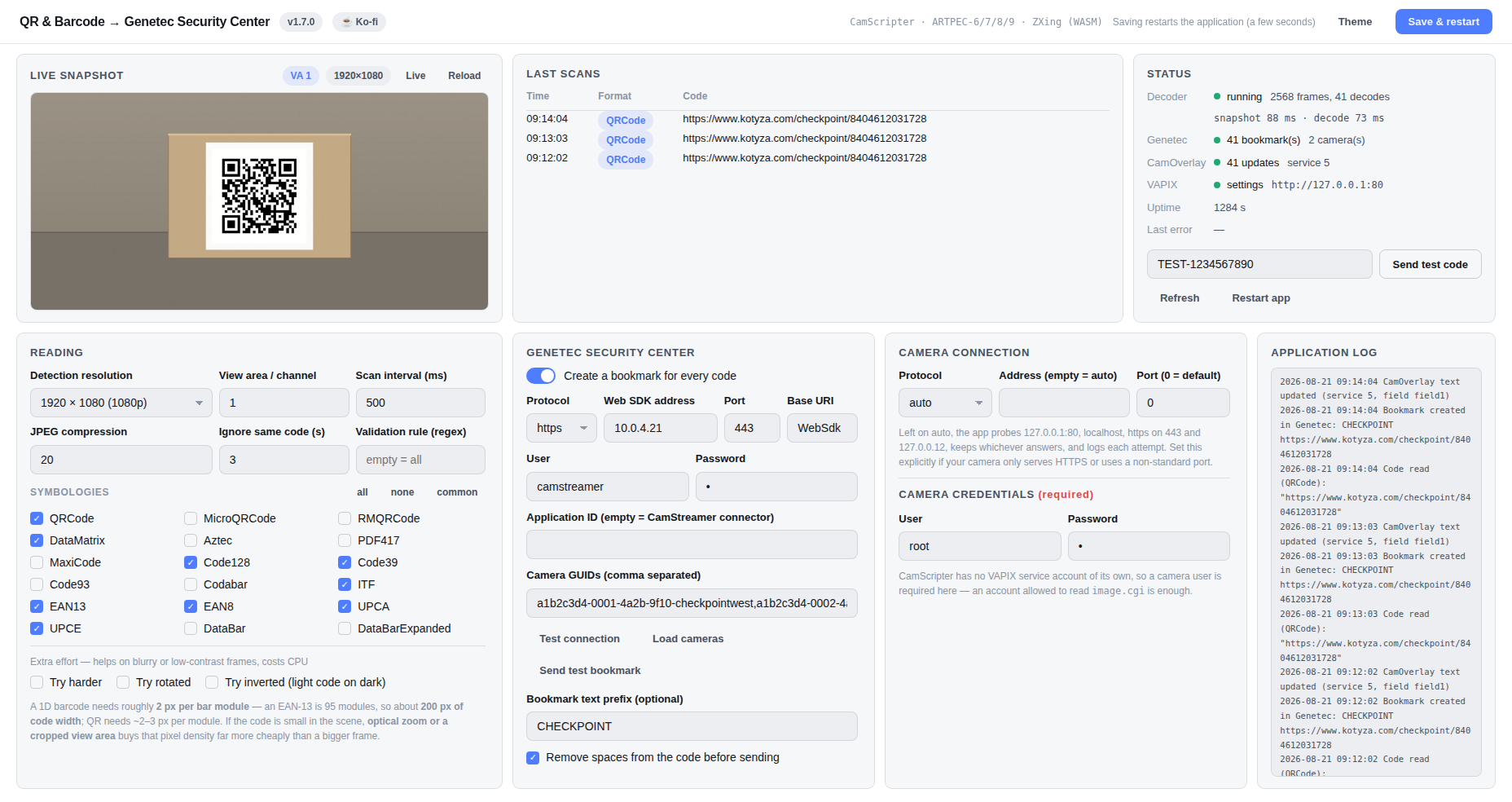
Everything on one page on the camera: live view of the view area being decoded, scans, decoder and Genetec status, and every setting. Follows your theme — light and dark both included.
CamScripter package · Axis ARTPEC-6/7/8/9
Reads QR codes and barcodes on the camera itself and creates a bookmark in Genetec Security Center for every scan — no middleware server, nothing to compile.
Everything on one page on the camera: live view of the view area being decoded, scans, decoder and Genetec status, and every setting. Follows your theme — light and dark both included.
Why this one
Each code becomes a camera bookmark through the Genetec Web SDK — a timestamped, searchable marker on that camera's video, findable from the Security Desk timeline. No connector service, no polling script, no cloud hop.
The barcode never travels as video to be read somewhere else. One camera captures, decodes, filters and pushes — so a checkpoint is one device, not a device plus a server.
Decoding runs in a Node.js worker thread and the VMS call is fire-and-forget, so a slow frame or an unreachable server can't stall the settings page or the next scan — the failure mode that makes naïve readers freeze exactly when they matter.
QR, Micro QR, rMQR, DataMatrix, Aztec, PDF417, MaxiCode, Code128, Code39, Code93, Codabar, ITF, EAN-13/8, UPC-A/E, DataBar and DataBar Expanded. Every family costs a detection pass, so you enable only what you scan.
A regex validation rule drops codes that don't belong, and a de-duplication window stops one code sitting in frame from flooding the VMS with the same entry twice a second.
Live view of the exact view area being decoded, scan history, snapshot and decode timings, Genetec counters, CamOverlay update count and a rolling log. It warns you when decode is slower than your scan interval.
Speed
Decoding is zxing-cpp compiled to WebAssembly — the engine behind most serious open-source scanning — reading the camera's JPEG directly, with no intermediate decode step in JavaScript.
Decoder benchmark
One QR code in a 1280×720 frame — same image, same machine. Lower is better.
| zxing-wasm used here | 20.5 ms | |
| zbar-wasm | 71.6 ms | |
| jsQR | 269.5 ms |
On the camera
Measured on an AXIS Q1656 (ARTPEC-8), 720p capture, nine common symbologies enabled.
Decoding is a CPU workload — on Axis hardware the DLPU runs neural networks only, so no barcode decoder uses it. Framing, not compute, is what limits read range.
The platform
CamScripter is CamStreamer's scripting host for Axis cameras: it runs Node.js packages on the camera itself, gives each one a settings page in the camera's web UI, and keeps them alive across reboots. This project is one of those packages — which is why there is no build step, no cross-compilation per chip generation, and no server to maintain anywhere.
Upload one .zip and it runs. The same file works on ARTPEC-6, 7, 8 and 9, and it
updates by uploading the next version.
CamOverlay is optional — only needed if you want the scanned text drawn on the video for operators.
Try it free
Every CamScripter app runs on a 30-day trial on any ARTPEC-6, 7, 8 or 9 camera — CamOverlay too. Long enough to install this package and see real scans in your VMS before spending anything. The package itself is free and MIT licensed.
Download CamScripter & CamOverlayInstall
qr_barcode_genetec_<version>.zip from the
latest release.image.cgi is enough.Saving restarts the package; it is back in a few seconds. The status panel shows the bookmark count and the last error, and the first scan appears under Last scans.
Requirements
Genetec side
Nothing to install on the Security Center side: the package talks to the
Genetec Web SDK and calls
AddCameraBookmark for each code. You need a Web SDK role, a user allowed to add bookmarks, and an
SDK certificate (application ID).
POST https://<server>:<port>/WebSdk/action
     ?q=AddCameraBookmark(<camera GUID>,<2026-08-21T09:14:04.312Z>,CHECKPOINT 8404612031728)
Authorization: Basic base64("<user>;<application id>:<password>")
Accept: text/json

→ 200 {"Rsp":{"Status":"Ok"}}
Rsp.Status too, and surfaces whatever came back in the status panel instead of silently counting a
bookmark that never landed.The settings page can list every camera in Security Center and let you tick the ones a bookmark should be attached to — one code can bookmark several cameras at once. Test connection and Send test bookmark use the values currently in the form, so you can prove the path before saving.
Getting reliable reads
A 1D barcode needs roughly 2 px per bar module — an EAN-13 is 95 modules, so about 200 px of code width in the captured frame. QR needs ~2–3 px per module. If a code looks crisp to your eye but won't read, it is almost always too small in the frame, and no amount of try harder will recover bars the sensor never resolved. Optical zoom or a cropped view area buys that density far more cheaply than a bigger frame does.
Free and open
Use it, fork it, ship it. If it saved you a middleware server, a coffee is always welcome — never required.