Answer Claude from your Stream Deck.
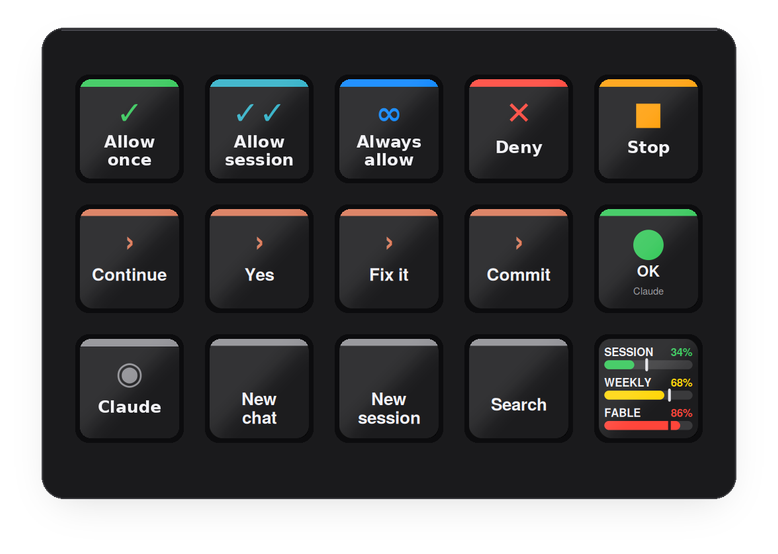
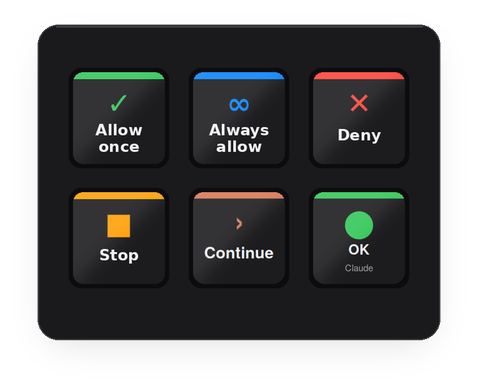
Allow once, allow always, deny, stop, "continue" — the prompts you answer fifty times a day, on physical keys. Plus Claude's own shortcuts, a live status.claude.com light, and your usage budget on the whole deck when you step away.
Walk away, and the deck tells you what's left.
Thirty seconds without a press and every key becomes one chart — session, weekly and the per-model cap, a limit per row, the row's full width being 0 to 100%. Touch any key and your layout is back; that first press is swallowed, so waking the deck can never fire Allow or Deny. The Claude Usage key toggles the same view on demand.
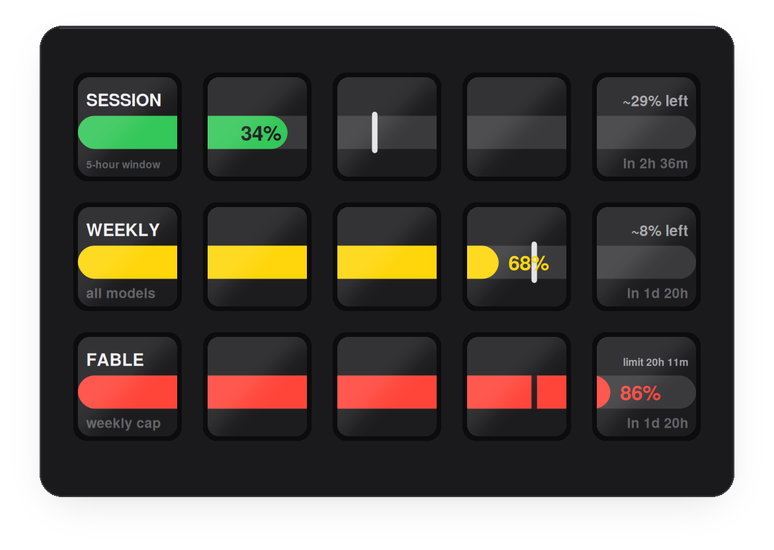
| The vertical mark | How far through that window you already are. Bar behind the mark means you are under pace; past it means you are burning faster than the window allows, and the bar turns red. |
| The caption | Where you land at this rate — ~8% left at the reset, or limit 20h 11m if you are on course to run out before it. |
| Where the numbers come from | The same source as the desktop app's usage popup: your existing Claude Code sign-in, read locally on this Mac. Nothing is sent anywhere, and nothing is polled at all while you are using the deck. |
Drag what you need.
The plugin adds a "Deck for Claude" group to the Stream Deck action list — the same way any other plugin does. The bundled profile is one arrangement; every key is replaceable.
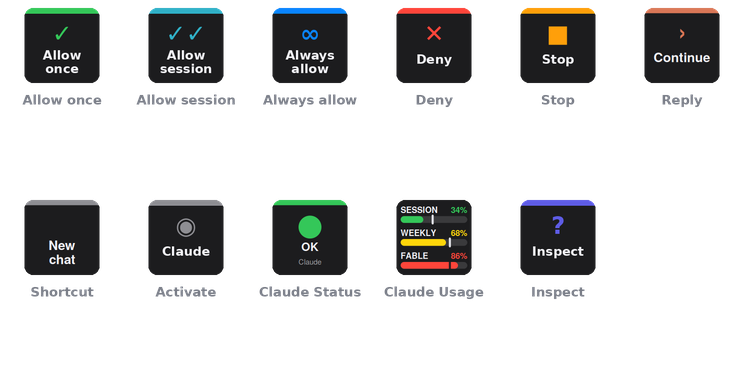
| Allow once · Allow for session · Always allow · Deny | Presses that button in the permission prompt that is currently on screen. The desktop app has no keyboard shortcuts for these, so the helper finds the button through macOS Accessibility and presses it — about 50 ms. |
| Stop | Brings Claude to the front and presses Esc. |
| Reply | Types a text you configure ("continue", "yes", "fix it", "commit"…) and presses Return. Claude is activated first, so it never types into the wrong window. |
| Shortcut | Sends one of the app's own accelerators: new chat ⌘N, new Claude Code session ⌘⇧O, search ⌘⇧K, command palette ⌘K, sidebar ⌘B, previous / next session ⌘⇧[ ⌘⇧], side chat ⌘;. |
| Claude Status | Polls status.claude.com every minute. Green, yellow, orange, red follow the incident level; the small line names the affected component. Press opens the status page. |
| Claude Usage | Session, weekly and per-model limits with the on-pace mark and forecast. Alone on a row it is a compact three-bar tile; press it to turn the whole deck into the chart. Several on one row share a single wide bar across those keys. |
| Activate Claude · Inspect | Bring the app forward; write every button label Claude exposes to a log — the repair tool for the day a button gets renamed. Inspect is off the 15-key profile by default now that Usage has that spot; drag it on when you need it. |

Mini, MK.2, XL — a profile for each.
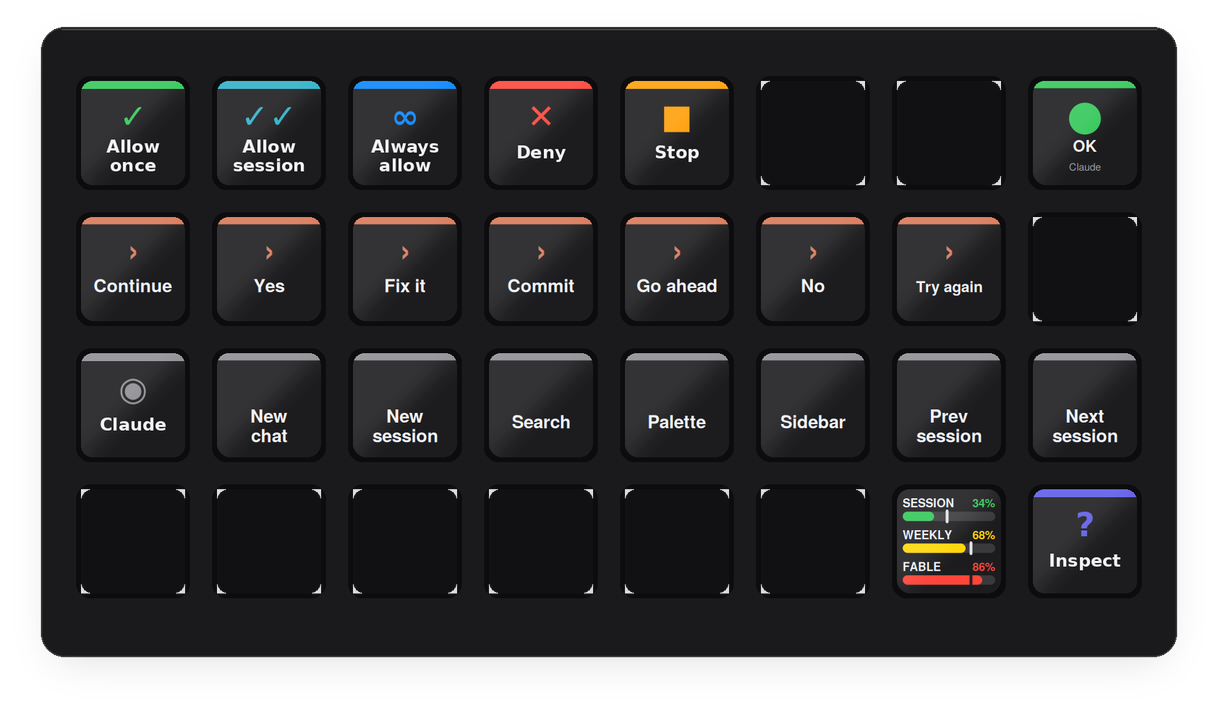
The installer carries three ready-made profiles — Claude (MK.2, 5×3), Claude Mini (3×2) and Claude XL (8×4) — and Stream Deck installs only the one that matches your device. Six essentials on the Mini; the full set with spare replies and every shortcut on the XL. The MK.2 and XL layouts keep one key for Claude Usage — the Mini spends all six on controls and relies on the idle chart instead.
A URL, a small app, a button press.
Nothing runs in the background besides the plugin itself. Each key press travels this path:
Stream Deck plugin
Node.js, Elgato SDK v2. A key press opens claudedeck://always-allow.
ClaudeDeck.app
A tiny URL-scheme handler in ~/Applications, installed by the plugin on first start.
axpress
Swift helper inside the app. Walks Claude's accessibility tree and presses the matching button.
Claude
The prompt is answered. Works even when Claude isn't the front window.
The usage chart takes a different path: it reads the OAuth token Claude Code keeps in your login keychain and asks Anthropic's usage endpoint for your limits — only while the chart is on screen, so there is no traffic while you are working the deck. That endpoint is undocumented and rate-limited, so the plugin backs off when told to and keeps showing the last good figures.
Three steps, once.
Download and double-click
com.4xsdev.claude.streamDeckPlugin — Stream Deck asks to install the plugin. It brings the Deck for Claude actions, a ready profile for your deck (Mini, MK.2 or XL), and the helper app.
Grant Accessibility
macOS asks once for ClaudeDeck under System Settings → Privacy & Security → Accessibility. This is what lets it press buttons in Claude.
Switch to the Claude profile
Or drag single actions from the "Deck for Claude" group onto keys of your own profile. Reply and Shortcut keys have settings in the inspector.
Other Stream Deck plugins.
Physical keys for the tools you already use. All free and open source.
Camera Deck for Axis & CamStreamer ↗
PTZ, presets, overlays and CamStreamer/CamSwitcher control for Axis cameras
Deck for AXIS Camera Station Edge ↗
Recording playback, PTZ and view controls for ACS Edge
Deck for AXIS Camera Station Pro & 5 ↗
Playback, cameras, PTZ presets and any hotkey for ACS 5 & Pro
Deck for Genetec Security Desk ↗
Playback, alarms, tiles, PTZ, doors and any camera by logical ID for Security Desk
Deck for Milestone XProtect ↗
Playback, evidence, PTZ, views and any camera or view by number for XProtect Smart Client